
Godot debug cameras with ImGui
Guide on how to add a SubViewport camera view to your scene using ImGui plugin 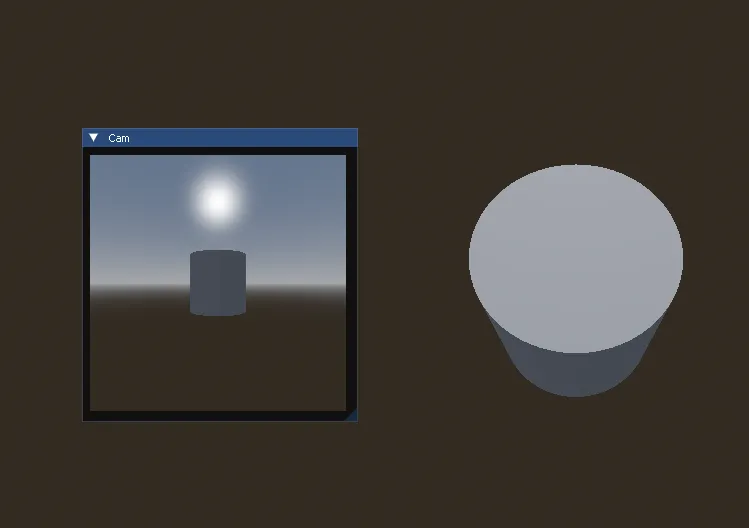
This code lets you create a Node that draws an ImGui frame containing currently visible SubViewport frame:
extends Node
@export var viewport : SubViewport
func _process(_delta: float) -> void:  Cam()
func Cam() -> void:  ImGui.Begin("Cam")  ImGuiGD.SubViewport(viewport)  ImGui.End()
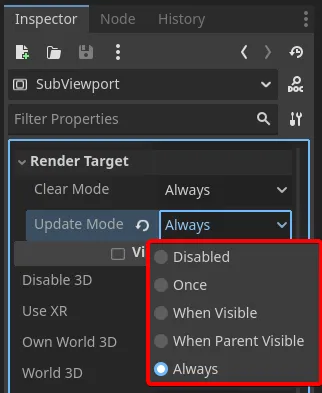
All you need to do is add a SubViewport with a camera child to your scene, link that SubViewport to this Node’s export in editor and then in SubViewport properties set Render Target -> Update Mode to Always.
Moving camera around
One issue when dealing with SubViewports is that they are of class Node, meaning when you add your camera that is either Camera3D or Camera2D it exists in its own transform hierarchy. It won’t move with the rest of world, so you’ll have a hard time interacting with global_transform to attach it to some object properly.
Godot has a nice node just for that - RemoteTransform3D (or 2D). Add this node as a child to your moving object and in properties select another object you’d like to attach to it.
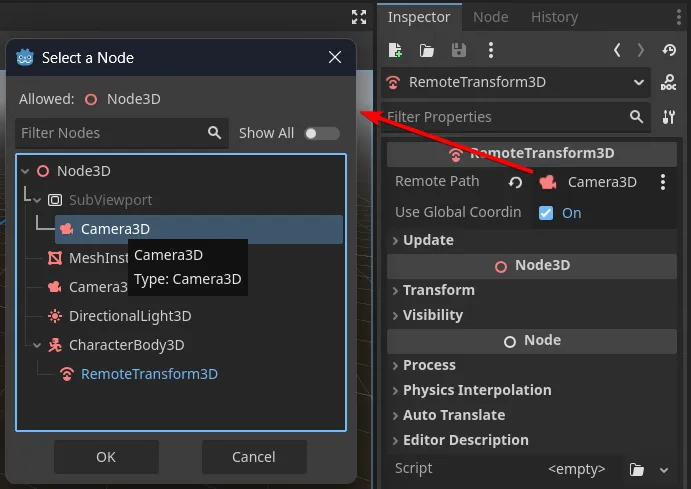
Depending on use case, your RemoteTransform3D probably shouldn’t manipulate camera itself but rather a pivot node that holds that camera within SubViewport.
You can also disable Update of separate transform properties like Rotation to provide your own logic or just have a fixed top-down view at all times.